The Telecom Analytics for Fraud Management and Consumer Protection (TAFCOP Portal), introduced by the Department of Telecommunications (DoT), enables users to monitor and manage mobile numbers associated with their Aadhaar. Designed to combat identity theft and SIM card fraud, it allows individuals to identify and report any unauthorized mobile connections.
Through TAFCOP, users can quickly verify the mobile numbers registered under their Aadhaar and flag any unfamiliar ones. This service is crucial in safeguarding users against scams, phishing attacks, and other forms of mobile-related fraud.
Verify Mobile Connections Linked to Your Aadhaar on the TAFCOP Portal
The TAFCOP portal enables users to see all mobile numbers registered with their Aadhaar. This feature is essential for identifying any unauthorized or fraudulent SIM cards associated with your identity.
Follow the step-by-step guide below to easily check all mobile connections registered in your name through the TAFCOP portal.
Step 1: Access the Official TAFCOP Portal
Open a Browser: Use any web browser on your computer or mobile device.
Visit the Website: Type https://tafcop.sancharsaathi.gov.in/telecomUser/ in the address bar and hit Enter.
Step 2: Enter Your Mobile Number
- Find the Mobile Number Field: On the TAFCOP homepage, locate the field where you can enter your mobile number.
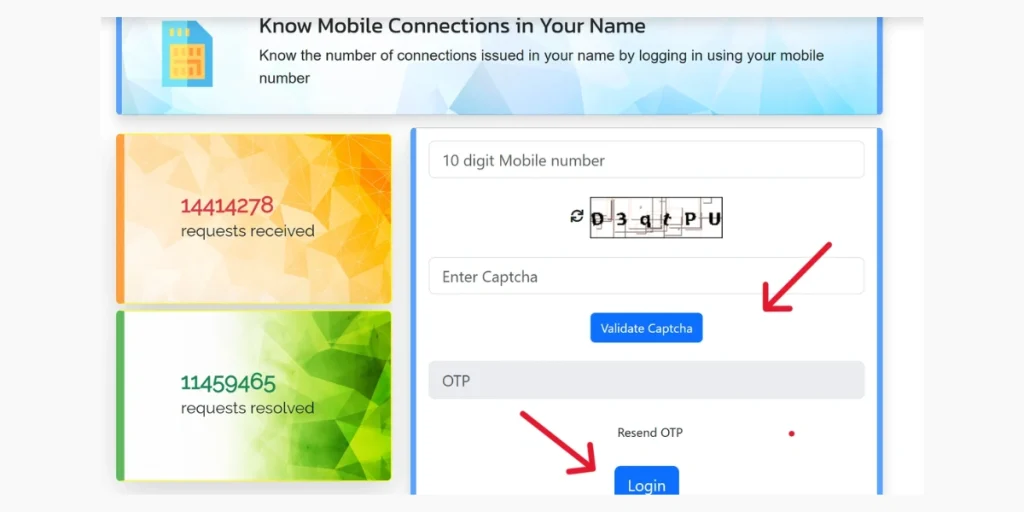
- Enter Your Active Mobile Number: Input the mobile number that is registered with your Aadhaar Card.
- Click ‘Request OTP’: Tap the button to receive a One-Time Password (OTP) on your mobile.
Step 3: Verify with OTP
- Check Your SMS: Open your inbox to find the OTP sent by the TAFCOP portal.
- Enter the OTP: Input the received OTP in the designated field on the portal.
- Submit: Click ‘Validate’ and then ‘Login’ to proceed.
Step 4: View Mobile Numbers Linked to Your Aadhaar
- See Linked Numbers: After OTP verification, the portal will display all mobile numbers registered under your Aadhaar.
- Review Carefully: Check the list thoroughly to spot any numbers you do not recognize.
Step 5: Report Unauthorised Numbers (If Needed)
If you notice any unfamiliar or unauthorised mobile numbers, you can report them directly on the TAFCOP portal:
- Select the Number: Tick the checkbox next to the suspicious mobile number.
- Choose an Action:
- ‘Not My Number’: Select if the number does not belong to you.
- ‘Report for Disconnection’: Choose if the number was issued without your consent.
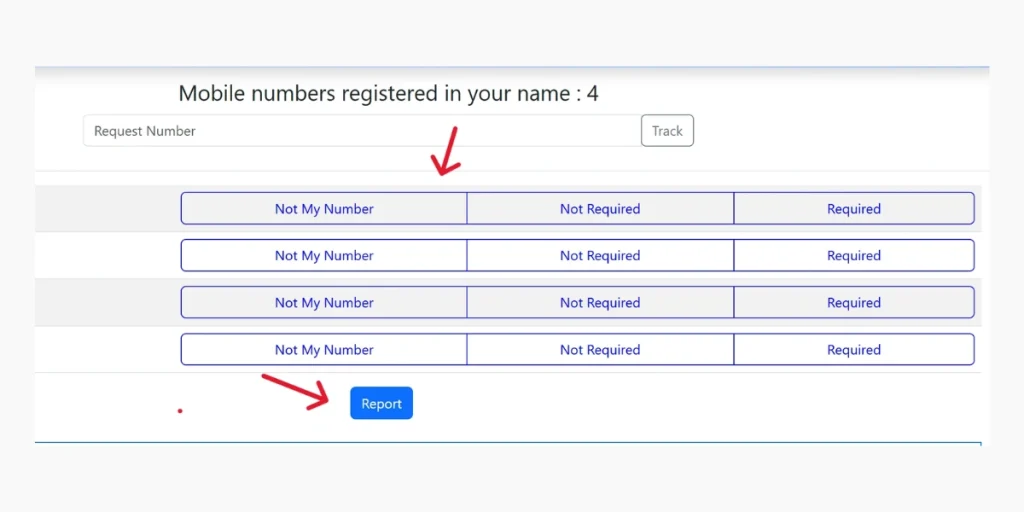
- Provide Additional Details: If asked, enter any extra information or reasons for reporting the number.
- Submit Complaint: Click ‘Submit’ to file your report with the concerned telecom provider.
By following these steps on the TAFCOP portal, you can efficiently manage the mobile connections linked to your Aadhaar and protect yourself from fraudulent activities.
Report Unwanted Mobile Numbers on TAFCOP
If you notice any unknown or unauthorised mobile numbers, you can:
- Select the Number: Tick the checkbox next to the suspicious number.
- Choose an Action: Select ‘Report for Disconnection’ or ‘Not My Number’ as appropriate.
- Provide a Reason: If prompted, enter the reason for reporting the number.
- Submit Your Request: Click ‘Submit’ to send your report, and the telecom service provider will take the necessary action.
Why the TAFCOP Portal Is Important
The TAFCOP portal is a vital tool for safeguarding users against SIM-related fraud and identity theft. Here’s why it matters:
Prevents SIM Frauds
- Prevents SIM Frauds: It stops fraudsters from obtaining SIM cards using your Aadhaar without your permission.
- Quick Identification and Reporting: Users can easily identify and report any unauthorized numbers linked to their Aadhaar.
- Protects Against Illegal Activities: Fraudulent SIM cards are often used for scams, phishing, and other unlawful activities, making monitoring essential.
| Example: A user discovered five mobile numbers registered under their Aadhaar, but was actively using only two. They reported the remaining three for disconnection, preventing possible misuse. |
Prevents Financial Fraud
- Fraudulent SIM cards are commonly used in financial scams, including phishing calls and OTP theft.
- TAFCOP helps secure mobile numbers linked to bank accounts from unauthorised access.
- It prevents criminals from exploiting OTP-based services, such as UPI and online banking.
| Example: Scammers had obtained a SIM using someone’s Aadhaar and attempted to reset their UPI PIN. Using TAFCOP, the user quickly identified and deactivated the unauthorized number, preventing potential fraud. |
Manages SIM Limits
- Allows users to track all SIM cards registered under their Aadhaar.
- Ensures compliance with the DoT rule of a maximum of 9 mobile connections per Aadhaar.
- Enables users to identify and deactivate any numbers that exceed this limit.
| Example: A user had 12 mobile numbers registered under their Aadhaar and deactivated 4 of them to comply with DoT regulations. |
Sanchar Saathi
Sanchar Saathi is a citizen-focused initiative launched by the Department of Telecommunications (DoT), Government of India. Accessible via the web portal https://sancharsaathi.gov.in/, it aims to empower mobile subscribers by enhancing security and increasing awareness about various telecom services.
Key Features of Sanchar Saathi
- Block Lost or Stolen Mobile Devices (CEIR): Using the Central Equipment Identity Register (CEIR) module, users can block their lost or stolen mobile phones across all telecom networks in India, rendering them unusable. If the device is recovered, it can be unblocked via the portal.
- View Mobile Connections Linked to Your Name (TAFCOP): This feature allows users to check all mobile connections registered under their Aadhaar. Any unauthorised or unnecessary connections can be reported, helping prevent identity theft and unauthorised SIM usage.
- Chakshu – Report Suspicious Calls & Spam: Citizens can report suspicious calls, SMS, or WhatsApp messages that may be related to cybercrime, financial fraud, impersonation, or other malicious activities. Unsolicited commercial communications (spam) can also be reported, enabling regulatory action against spammers.
- Verify Mobile Handset Authenticity (KYM): Before buying a new or used mobile phone, users can check its authenticity using the device’s IMEI number, ensuring the handset is genuine and not counterfeit.
- Report International Calls Using Indian Numbers: This feature allows users to report international calls that appear as local Indian numbers, a common tactic in telecom fraud. Reporting such calls helps authorities take action against illegal setups.
- Identify Wireline Internet Service Providers (ISP): By entering a PIN code or address, users can find the available wireline ISPs in their area, helping them make informed decisions when choosing internet services.
In addition to these services, Sanchar Saathi includes a “Keep Yourself Aware” section, offering updates and educational resources on end-user security, telecom, and information security. The platform is also available as a mobile application, providing convenient access to all its features.
Overall, Sanchar Saathi is a comprehensive platform designed to safeguard mobile subscribers in India, promoting secure, informed, and responsible use of telecom services.
FAQ
What is the TAFCOP portal?
The TAFCOP portal (Telecom Analytics for Fraud Management and Consumer Protection) is an online platform by the Department of Telecommunications (DoT) that allows users to track mobile numbers linked to their Aadhaar, report unauthorized SIMs, and protect against fraud.
How can I check all mobile numbers registered under my Aadhaar?
Visit the TAFCOP portal, enter your Aadhaar-linked mobile number, request an OTP, and verify it. The portal will display all mobile connections registered under your Aadhaar.
What should I do if I find an unauthorized number?
If you discover a number you do not recognize, select it on the portal and choose ‘Not My Number’ or ‘Report for Disconnection’. Provide any additional details if prompted and submit the report.
How does TAFCOP help prevent financial fraud?
TAFCOP protects your mobile numbers linked to bank accounts from unauthorized access. By identifying and deactivating fraudulent SIMs, it prevents scammers from using OTP-based services like UPI or online banking for financial fraud.